
TL;DR
Fix allocation errors before an audit by encoding your allocation logic as code instead of formulas in a spreadsheet. A versioned rule set processes every invoice the same way every period, records who changed each rule and when, and logs exceptions instead of hiding them in edited cells. The output is a per-line audit trail: source invoice, rule applied, rule version, approver, timestamp, and the GL accounts debited and credited.
Why Does Spreadsheet Allocation Fail the Audit Test?
In Ceviche's 2026 analysis of 80 PE and VC fund finance teams, 49% had no formal audit trail for expense allocation and 81% still ran allocation in Excel (research). A 49% audit-trail gap is not a story about careless controllers. It is a story about what spreadsheets cannot do, no matter how disciplined the person running them. Three failure modes show up in every spreadsheet-based process.
The first is methodology drift. Allocation percentages and rules change quarter to quarter, and the spreadsheet records the new number without recording why it changed or what it replaced. By period 12, the allocation logic no longer matches period 1, and nobody can say when it moved.
The second is missing version history. When an auditor asks what rule was applied to a specific invoice in Q2 of last year, the controller cannot reconstruct it. The current file shows the current formula. The prior file, if it was saved separately, shows a snapshot with no record of edits between saves.
The third is silent manual overrides. A controller edits one cell to handle a one-off exception, an unusual co-invest charge or a partial fund attribution. That edit is correct in the moment. The problem is that it disappears the instant the file is saved, because a spreadsheet stores the value, not the decision behind it. The next person to open the file sees a number with no flag, no note, and no way to tell it apart from a formula result.
None of these are mistakes a more careful controller avoids. A spreadsheet stores values, not decisions, and an audit tests the decisions. That mismatch is structural, which is why the gap shows up across firms rather than at a few sloppy ones.
Definition: Immutable Audit Trail
An immutable audit trail is a permanent, tamper-evident record of every expense allocation, where each journal entry is locked to the source invoice, the allocation rule and rule version applied, the approver, the timestamp, and the GL accounts debited and credited. No entry can be edited or deleted after it posts. Changes create a new versioned record, so any external auditor or SEC examiner can trace a single line item back to the invoice and the LPA clause that authorized the charge.
Allocation-as-Code: How Does the Fix Work?
Allocation-as-code replaces the formulas in your spreadsheet with a defined rule set that the software applies to every invoice. A spreadsheet formula lives in one cell and breaks the moment someone edits the cell next to it. A rule lives in the system and runs the same way against line item 1 in Q1 and line item 9,000 in Q4. The same logic produces the same allocation, so the methodology drift that auditors catch never happens.
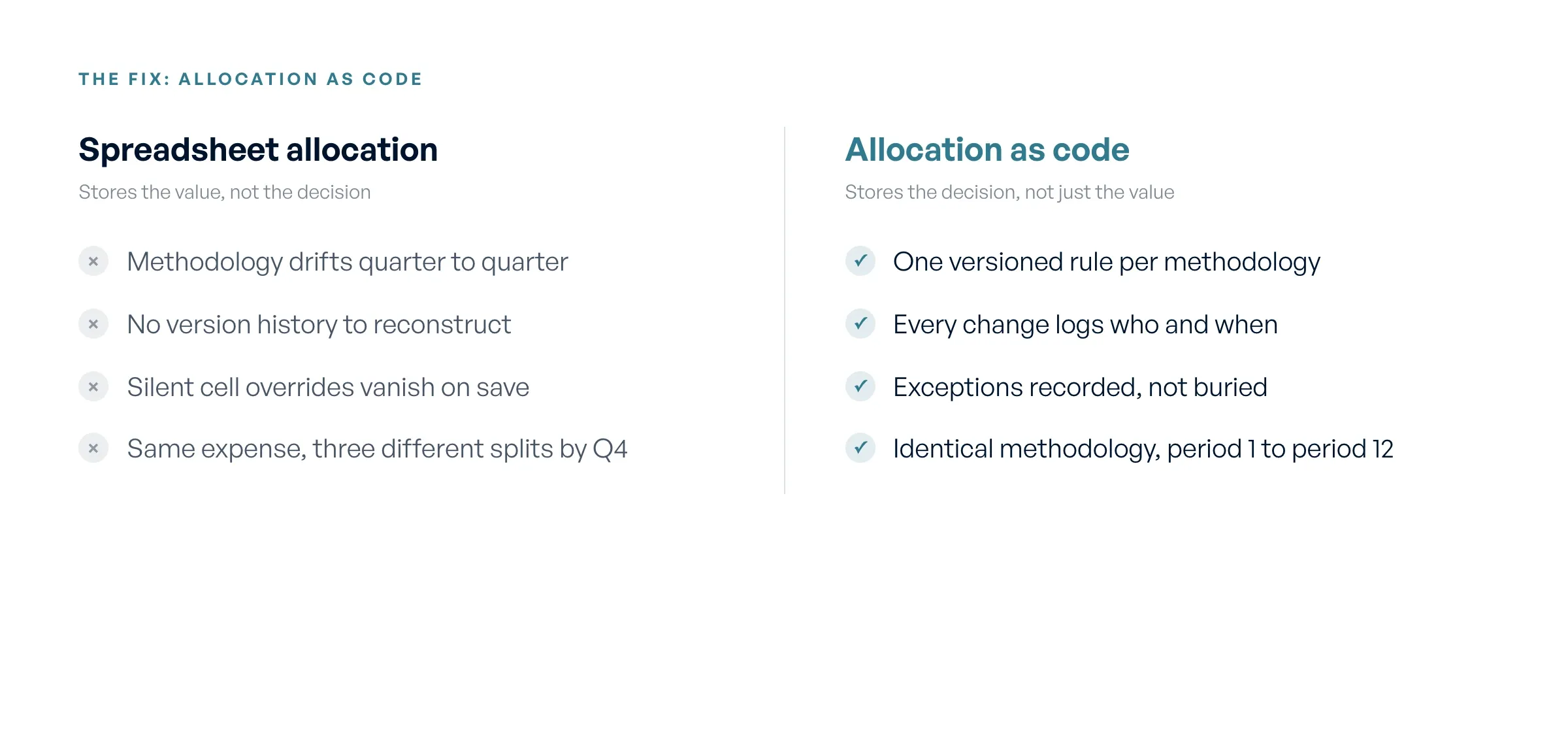
Spreadsheet allocation stores values; allocation-as-code stores the decision, with a versioned audit trail.
Rule versioning closes the gap that silent cell edits open. When you change an allocation rule, the system records who changed it, the date and time, the prior version, and the new one. A controller who shifts a legal-fee allocation from pro rata to committed-capital does not overwrite history. The old rule stays on file, attached to every entry it processed, and the new rule applies only from its effective date forward. An auditor asking why a Q2 invoice split differently than a Q4 invoice gets a dated answer instead of a shrug.
Exceptions get logged rather than buried. In a spreadsheet, a controller edits a cell to fix a one-off charge and that override disappears when the file saves. In an allocation-as-code system, the exception is a recorded event with a reason, an approver, and a timestamp. The standard rule still shows what should have happened, and the override shows what did, side by side.
The result is a methodology you can prove identical across periods. The rule set that ran in period 1 is the same rule set that ran in period 12, and every change between them is on the record. Consistency stops being a claim you defend and becomes a log you produce.
What Does an Audit-Ready Line-Item Record Contain?
An audit trail is not a folder of saved spreadsheets or a reconciliation summary. At the transaction level, it means every journal entry carries six fields that together let an outside party reconstruct the charge without your help.
For each journal entry, the record stores:
- Source invoice. The original document the line item came from, with its vendor, date, and line number.
- Allocation rule applied. The named rule that determined how this line split across entities, for example committed-capital pro rata or a fixed Fund I / Fund II / SPV ratio.
- Rule version in effect. The specific version of that rule as it stood on the transaction date, not the version running today.
- Approver. The person who reviewed and signed off, by name and role.
- Timestamp. When the entry was created and approved, to the second.
- GL accounts debited and credited. The exact accounts the entry posted to in your general ledger.
The point of those six fields is chain of custody. An external auditor or SEC examiner can start from one journal entry, follow it back to the source invoice, see which rule and which version processed it, and confirm the LPA clause that authorized the charge. The examiner does the walk themselves. You are not reconstructing the path from memory or digging through email chains to explain why a 2024 invoice split the way it did.
Use those six fields as a checklist against any vendor. If a product cannot show the rule version in effect at the time of a prior-period entry, it cannot prove consistent application, and the audit trail is incomplete regardless of how the vendor describes it.
Worked Example: A 25-Line Outside-Counsel Invoice
Take a single outside-counsel invoice for $84,200 covering deal diligence, fund formation amendments, and SPV setup work. The 25 line items split across three entities by three different methodologies, which is exactly the case spreadsheets handle worst.
Twelve line items totaling $41,000 are deal-diligence fees tied to a specific portfolio investment. Those allocate pro rata by committed capital across Fund I (60%) and Fund II (40%). Fund I takes $24,600 and Fund II takes $16,400. Eight line items totaling $28,200 cover fund-formation amendment work, allocated 50/50 by partnership agreement to Fund I and Fund II. Each fund absorbs $14,100. The remaining five line items, $15,000 of SPV organizational work, allocate 100% to the co-invest SPV, because the LPA bars charging entity-specific formation costs to the main funds.
Run the arithmetic and the totals land cleanly. Fund I owes $38,700, Fund II owes $30,500, and the co-invest SPV owes $15,000, summing back to $84,200. A spreadsheet can produce these numbers. What it cannot produce is a defensible record of which rule drove each split and which LPA clause authorized it.
One line item after software processes it
Take line 7, a $3,400 diligence charge inside the $41,000 deal-diligence block. After the allocation engine runs, the record for the Fund I portion reads like this:
- Source invoice: OC-2026-0417, line 7, $3,400
- Allocation rule applied: COMMITTED-CAPITAL-PRORATA (deal diligence)
- Rule version in effect: v3, effective 2026-01-01
- Split result: Fund I $2,040 (60%), Fund II $1,360 (40%)
- Approver: J. Reyes, Controller
- Timestamp: 2026-04-18 14:32 ET
- GL write-back: DR Fund I 6420 Legal Expense $2,040, CR Management Co 2010 AP Clearing $2,040
- Authorizing LPA reference: Fund I LPA §7.3(b), deal expenses
An auditor pulling that journal entry sees the original invoice line, the rule that produced the 60/40 split, the version of that rule on the day it ran, who approved it, and the exact GL accounts touched. No email thread, no controller memory, no reconstruction. When the examiner samples line 7 of invoice OC-2026-0417 six months later, the record returns the same numbers and the same rule version it recorded at the close.
How Do You Produce a Clean Allocation Record for an External Audit?
An external auditor or SEC examiner reviewing your expense allocation asks for three things every time. The first is methodology documentation, meaning the written rules that govern how each expense category splits across funds and the LPA clauses that authorize them. The second is sample transaction walkthroughs, where the examiner picks 20 to 50 specific journal entries and asks you to trace each one back to its source invoice and the rule applied. The third is evidence of consistent application, proof that you ran the same methodology in period 12 that you ran in period 1.
A spreadsheet reconstruction fails all three under pressure. You can produce a methodology memo, but the memo describes intent, not what the formulas actually did. When the examiner samples a Q1 invoice in Q4, you reopen an archived file and hope the percentages match the memo. You cannot prove consistency because each quarter's file is a separate artifact with no record of what changed between them.
A software-generated package answers each request from the same record. The methodology lives in the versioned rule set, so the documentation is the system, not a memo about it. Each sampled transaction returns its full lineage instantly, including the rule version in effect on the invoice date. Consistency is provable because the rule history shows every change, who made it, and when.
Before you sign with any vendor, confirm the audit trail meets examiner standards. Ask these five questions.
- Do you hold a current SOC 1 and SOC 2 report, and will you share it under NDA?
- Is the allocation record immutable, meaning a processed journal entry cannot be edited after the fact without a logged, attributed change?
- Does the rule history capture who changed each rule, when, and what the prior version was?
- Are permissions role-based at a granular level, so an approver cannot also author the rules they approve?
- What is the GL write-back scope, and does it post audit-ready entries to my existing ledger rather than requiring a migration?
If a vendor cannot answer all five, the audit trail will not hold when an examiner tests it.
Where Does Ceviche Fit?
Flybridge runs 18+ fund entities on Ceviche, with a per-line audit trail on every invoice. The transition was fast because Ceviche did not touch their general ledger. It read invoices upstream, applied the allocation rules, and wrote journal entries back to the GL they already ran.
Ceviche sits between your expense systems and your existing GL. It pulls invoices from Ramp, Bill.com, Brex, Expensify, or SAP Concur, applies your LPA-based allocation rules, and writes audit-ready journal entries into QuickBooks Online, NetSuite, or Sage Intacct. You keep your accounting stack. You add an allocation layer that carries the audit trail those line items never had on their own.
That deployment model is the practical difference from Allvue Systems. Allvue solves the audit-trail problem by replacing the accounting stack with an enterprise fund-accounting platform, which means a migration, a new system of record, and a longer timeline. Ceviche solves the same problem by adding allocation logic on top of the GL you already use. Both produce a defensible audit trail. One asks you to move your accounting; the other does not.
Be clear about what Ceviche is not. It is not a fund administrator, not an ERP, and not a managed service. It does not do the allocations for you the way a service like StavPay does. It is software a controller runs to apply allocation rules faster and produce a full audit trail. If you want someone else to own the allocation work, a managed service or fund administrator is the right call, not Ceviche.
Frequently asked questions
What is the difference between an audit trail and a reconciliation report?
A reconciliation report confirms that two balances match at a point in time. An audit trail records how every individual entry got to its value, including the source invoice, the rule applied, and the approver. Ceviche produces both, but examiners care about the trail, because reconciliation tells them the numbers tie out, not whether the methodology behind them was applied consistently.
Can I add an allocation layer without migrating off my current GL?
Yes. Ceviche sits between your expense systems and your existing GL, whether that is QuickBooks Online, NetSuite, or Sage Intacct, and writes audit-ready journal entries back into it. You keep your chart of accounts and your close process. Allvue solves the same audit-trail problem by replacing the accounting stack with an enterprise platform, which is a larger commitment than adding an allocation layer.
How long does it take to onboard expense allocation software?
Ceviche onboards in about 2 to 4 weeks. Timelines depend on how many allocation methodologies you run and how clean your existing rule documentation is, but encoding rules takes days, not months.
What does an SEC examiner actually look at when reviewing fund expense allocation?
Examiners request your allocation methodology documentation, then sample 20 to 50 transactions and walk each one from the journal entry back to the source invoice and the LPA clause that authorized the charge. They test whether the same methodology was applied in period 12 as in period 1. Inconsistent application across periods is the most common flag.
Do I need a fund administrator to have an audit-ready allocation process?
No. A fund administrator and audit-grade allocation are separate things. Ceviche is software you run to apply LPA-based rules and produce a per-line audit trail, not a fund administrator or a managed service. It does not perform the allocations for you. You define the rules, and the system applies them consistently and logs every exception.